Write a screenplay in Fountain
Fountain is a way of writing a screenplay as plain text. A line in capitals is a character; the line under it is what they say; a line starting with INT. or EXT. is a scene heading. There is nothing to click. Wit reads the text and lays it out in the standard screenplay format as you type. This guide goes through a short script from the title page to the PDF.
Shortcuts are for Windows and Linux. On a Mac, Alt is ⌥ and Ctrl is ⌘, and the script commands use ⌥⌘ instead of Ctrl+Shift; the full list is on GitHub.
1. Start a screenplay
Press Alt+N, choose Screenplay, and give it a title and an author. Wit makes a folder with script.fountain and a book.yaml settings file, already set to Courier Prime 12 pt on US Letter in the industry layout. If you write for Europe, open Page setup (Alt+L) and choose the Screenplay · A4 template; the measures stay the same.
If you have a Fountain file already, Alt+O opens it.
2. The title page
The first lines of the file, up to the first blank line, are the title page:
Title: The Patrol
Credit: Written by
Author: Ana Pop
Draft date: First draft
Contact: ana@example.com
Wit prints them as a title page before page 1. Leave them out and the script starts on page 1.
3. Scenes, action, characters, dialogue
After the title page, write the script:
FADE IN:

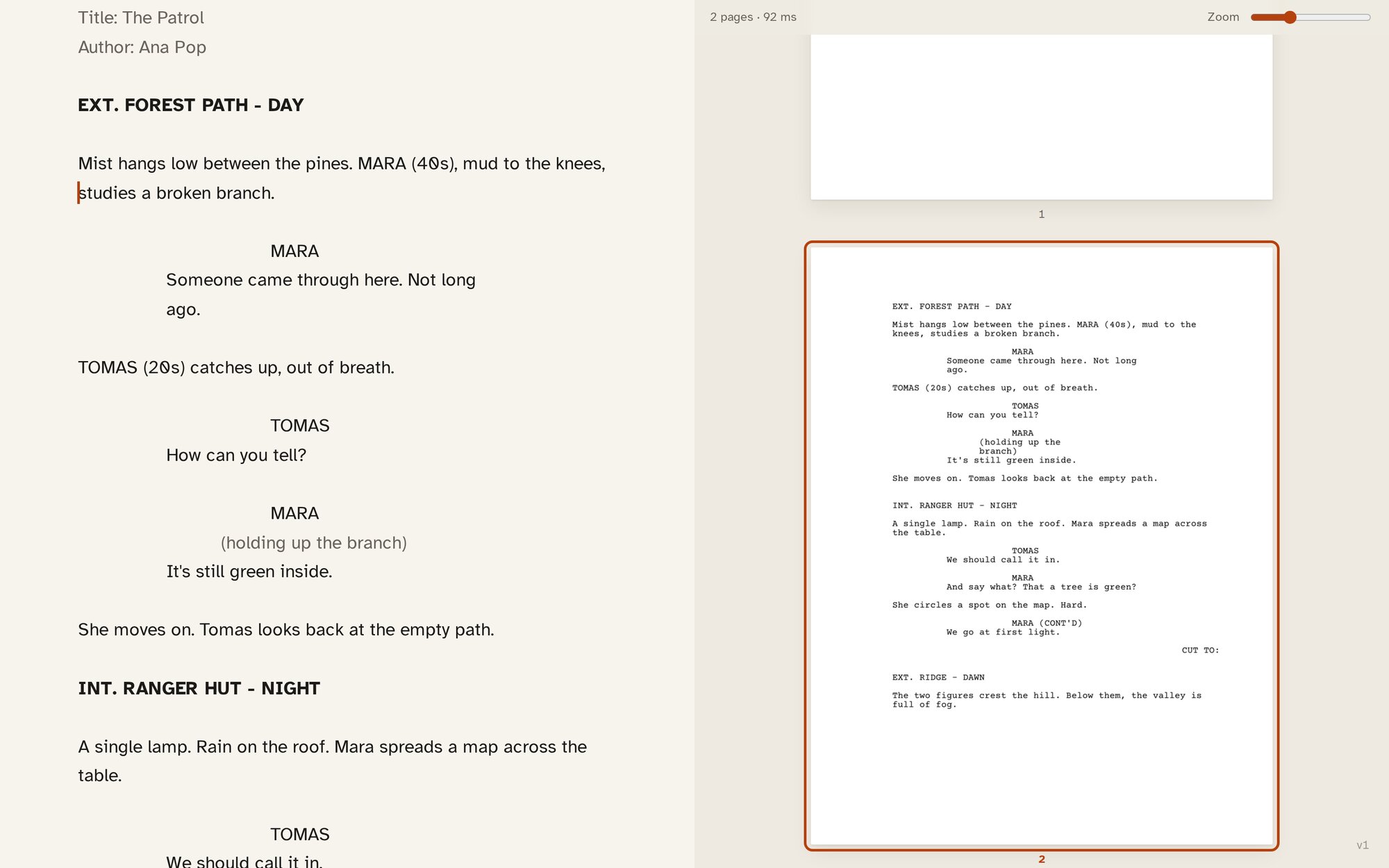
EXT. FOREST PATH - DAY

Mist hangs low between the pines. MARA (40s), mud to the knees,
studies a broken branch.

MARA
Someone came through here. Not long ago.

TOMAS (20s) catches up, out of breath.

TOMAS
How can you tell?

MARA
(holding up the branch)
It's still green inside.

CUT TO:
Wit recognises each element from its shape:
- A line starting with
INT.orEXT.is a scene heading. - A line in capitals, followed by text, is a character, and the text under it is their dialogue.
- A line in parentheses under a character is a parenthetical.
- A line in capitals ending in
TO:is a transition. - Everything else is action.
The editor indents each element on screen where it will print, so the text looks like a script while you write it. In the pages beside it, the scene heading sits at the left margin, the character name at 3.7 inches, the dialogue at 2.5 inches.
A few more marks you will want:
> THE END <centres a line.===forces a page break.[[a note]]is a note to yourself, and/* a boneyard */is cut material. Neither prints.*italic*,**bold**and_underline_work in dialogue and action.- When the shape isn’t enough, force the element: a full stop before a scene heading (
.FLASHBACK),@before a character,!before action,>before a transition.
4. Let the keyboard do the work
You can type a script with nothing but Enter and Tab:
- On an empty line, Tab cycles the element: action, character, scene heading, transition, and back. In a speech, Tab makes a parenthetical.
- After a character name, Enter moves to their speech. After a speech, Enter starts a new block.
- Shift+Enter is a plain new line.
The script commands do the same by name: Ctrl+Shift+1 scene heading, Ctrl+Shift+2 character, Ctrl+Shift+3 parenthetical, Ctrl+Shift+4 transition, Ctrl+Shift+5 centred text. They are on the formatting dock (Ctrl+Space) and in the command palette (Ctrl+Shift+P) like every other command.
Press Alt+[ for the scenes sidebar, which lists every scene heading, and Alt+] for statistics. A script page is about a minute of screen time, and the print checklist in Page setup says how many pages, and minutes, you have.
5. Options for the page
Page setup has two settings specific to scripts. Scene headings in bold does what it says. Scene numbers in the margins prints the numbers you write as #12# at the end of a scene heading. The margins and indents themselves follow the industry layout and don’t change.
6. Stage plays
A stage play is written the same way. Choose Stage play in the New dialog, or the Stage play · US Letter or Stage play · A4 template. Headings become the structure:
# ACT ONE

## Scene 1

A kitchen. Morning.

ANA
Did you lock the door?
The sidebar lists the acts and scenes, and Wit lays the play out in the US manuscript format: names centred, dialogue across the page, stage directions indented in italics. On an empty line, Tab cycles from character to act, scene and back.
7. Export the PDF
Press Alt+P for the Print PDF, the script on white pages, title page first. Alt+R gives a Proof PDF, the pages exactly as set up, for checking. In the desktop app, Wit asks where to save.
The script itself stays a .fountain file in your folder. Any other Fountain tool can open it, and so can any text editor.